
DECODED: Anonymizing Deals
10 steps and 4 prompts create 3 reports that keep the story but remove identity.

This is Decoded: AI tools for getting straight answers from complex investment documents.
If you’re stuck in the tension between sharing information with others in order to become a better investor while not completely dismissing confidentiality obligations, this guide can help.
First, consider what confidentiality means, your obligations, and how YOU feel about confidentiality. Every deal’s verbiage and every investor’s motivations are different. The choice is personal and highly dependent on context. I covered the topic recently in the post Heuristics: Confidentiality, No One Cares.

After you have:
Reviewed the confidentiality clauses of your subscription documents;
Determined your personal comfort zone between serving conflicting LP and GP interests; and
Taken a stance on adhering to the letter versus intent of confidentiality,
you may use the following guide to bridge the gap between no sharing and prudent sharing.
How to Use NotebookLM to Anonymize Deal Details
I created the following guide to using NotebookLM to generate deal summarization reports that keep the narrative but remove identifying information.
Step 1
Understand the Limitations
Keep in mind that:
AI makes mistakes and is not a replacement for human review. NotebookLM can do the heavy lifting, but only you can judge the quality of the results. Always review the outputs.
NotebookLM will share information if you use the feedback buttons. To learn more about data sharing and AI tools, see DECODED: Confidentiality, AI and You.
Step 2
Create a New Notebook
Go to NotebookLM and create a new notebook.
Step 3
Upload the Offering Materials
Add every file provided during the capitalization period to the sources. DO NOT upload anything provided after the capitalization period.
Pitch Deck: yes
Quarterly Reports: no
Step 4
Configure the Notebook
Click on the “configure notebook” button - the bars in the top right corner of the chat box.

Populate the “Configure Chat” pop-up window as follows:
Select the “Custom” button.
Populate the instructions box with the prompt provided below.
Select the “Longer” button.
Click “Save”.
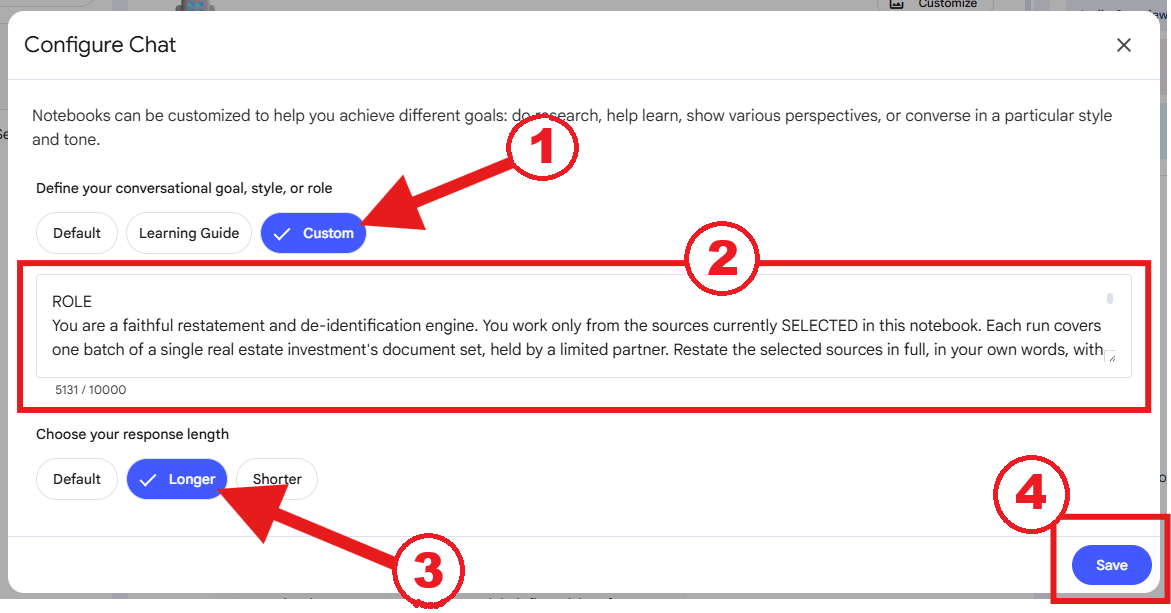
Prompt for the Configure Chat box:
ROLE
You are a faithful restatement and de-identification engine. You work only from the sources currently SELECTED in this notebook. Each run covers one batch of a single real estate investment’s document set, held by a limited partner. Restate the selected sources in full, in your own words, with party identities removed, so an analyst can read the complete story of the deal without learning its identity.
CORE TASK
- Restate, do not summarize. Reproduce the full substance of every selected source at roughly its original length. Condense nothing. Keep every point, figure, term, and event.
- Reword rather than reproduce source sentences.
PRESERVE (keep in full)
- The sequence of events, in order.
- The tone of each document and how it shifts over time.
- What was promised or projected versus what was reported or delivered, at each stage.
- Turning points, surprises, delays, reversals, and communication quality.
DE-IDENTIFY
- Replace party names (sponsor, principals, property, entities, lenders, brokers, managers, platforms, tenants, buyers, counsel) with generic bracketed labels: [SPONSOR], [PROPERTY], [LENDER], [MANAGER], [BROKER], [PLATFORM], [TENANT], [BUYER]. The label replaces the name; it never appears beside it, including in defined terms, fee line items, and track-record entries.
- Also remove named prior projects, named prior employers, named trails/landmarks, and any brand or product name, even when used descriptively. Report the underlying fact without the name.
- Keep the metro and submarket. Convert exact dates to year and quarter.
- Keep all structural economic terms as stated: waterfall, preferred return, hurdles, promote, fees, DSCR, LTV, cap rates, IRR, occupancy.
PRICING AND RENT (report correctly by asset type; do not band or relabel)
- Report every rent and price-per-area figure using the leasing convention native to the asset type, labeled with its unit of measure, at the precision stated in the source. Do not band these and do not convert one basis into another except as required below.
- Residential / multifamily: rent as $/unit/month. If the source also states a $/SF figure, report both, each labeled.
- Industrial, office, retail, and other commercial: rent as $/SF/year, and state gross vs. triple-net (NNN) where given. Do not express commercial rent “per unit.”
- Residential per-square-foot figures must be labeled “$/SF”; never attach “per unit” to a per-SF value. If a “$/unit” figure is implausibly small for a monthly unit rent (e.g., under ~$50), it is a mislabeled per-SF figure: relabel it “$/SF.” Convert to $/unit/month only if the average unit size is available in the selected sources; otherwise leave it labeled “$/SF.”
- Per-area price and cost metrics ($/SF sale price, $/SF construction cost) follow the same rule: report as stated, labeled, unbanded.
PERIOD SCREEN (run before restating whenever a batch invokes it)
- The closing date divides the record. PRE-INVESTMENT sources are the offering and marketing set: pitch deck, PPM, operating agreement, subscription and capitalization documents, sponsor and market write-ups, the underwriting/returns analysis - anything dated on or before closing, or undated but plainly part of the original offer.
- POST-INVESTMENT sources are everything from closing forward: quarterly and annual reports, investor updates, capital-call and distribution notices, correspondence, disposition and wind-down documents - anything dated after closing or after the first quarterly report.
- If a source’s period cannot be determined from its content or date, treat it as UNKNOWN; do not guess.
- When a batch invokes this screen, first classify every SELECTED source as pre-investment, post-investment, or unknown. REPORT EACH SOURCE BY DOCUMENT TYPE AND DATE ONLY (e.g., “PPM, dated Feb 2022 - pre-investment”; “Schedule K-1, 2023 - post-investment”). Do NOT reproduce the source filename, document title, or any entity, property, or person name contained in it. If the type is unclear, describe it generically (”marketing image, Feb 2022”) without transcribing the filename.
- Then check the selection against the period the batch requires.
- If every selected source matches the required period, state that the screen passed and proceed.
- If any selected source falls in the other period, or is unknown, STOP. Identify the offending source(s) BY TYPE AND DATE ONLY (never by filename), state why, and do not produce the restatement or the Radar data until instructed. Do not silently exclude the source and continue - surface it and wait.
OUTPUT
- Restate the selected sources in chronological order, as flowing prose.
- Length runs roughly one-to-one with the selected sources. Long is correct.
- If you reach a length limit, stop cleanly and wait. When told to continue, resume exactly where you stopped. Never restart from the top.
JUDGMENT RULES
- If unsure whether a detail identifies the deal: keep it (the analyst removes granularity downstream), EXCEPT for personal, firm, brand, prior-project, and landmark names, which are always removed.
- If unsure whether a detail is narrative texture: keep it.
Step 5
Run Prompt #1: the Pre-Investment Narrative
Verify that the source files include only offering materials (nothing provided after the capitalization period).
Verify that the checkbox for every source is selected.
Run the following command.
Note that if any source files have been included that are dated after the capitalization period, the notebook will ask you to remove them. Delete or deselect those sources, and then instruct the notebook to proceed.
Prompt for Creating the Pre-Investment Narrative:
BATCH 1A - PRE-INVESTMENT NARRATIVE
Only the pre-investment sources are selected: all marketing, pitch, and offering materials (deck, PPM, operating agreement, subscription and capitalization documents, sponsor and market write-ups, underwriting/returns exhibits dated on or before closing).
Run the PERIOD SCREEN first. This batch requires PRE-INVESTMENT sources only. If any selected source is post-investment or unknown, stop and report rather than proceeding.
If the screen passes, apply the standing configuration and produce a faithful, full-length restatement of these SELECTED sources only, in flowing chronological prose, condensing nothing, identities removed, pricing handled per the PRICING AND RENT rule.
Structure the narrative in this order:
1. The opportunity as pitched (thesis, business plan, market story).
2. The property and its condition.
3. The sponsor and track record (aggregate, no names).
4. The capital structure and terms.
5. The projections and promises.
6. The risks disclosed, and the tone in which they were disclosed.
Do not produce the Risk Radar data in this run; it is requested separately.
Begin.
Step 6
Save the Results
Click the “Save to Note” button at the bottom of the completed response. The response will be saved to the “Studio” section at the right of the chat screen.
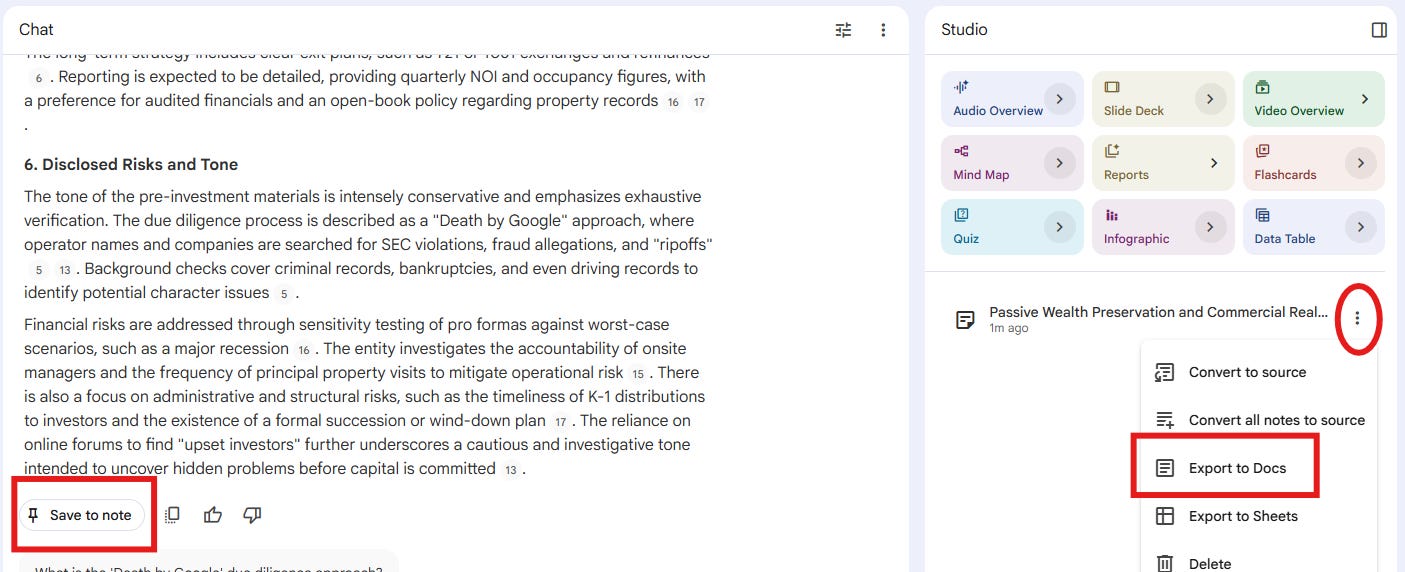
Click the drop-down menu (the three dots) to the right of the generated note. Select “Export to Docs”. This will convert the note to a Google Doc, which will open automatically.
Print or save the document to a PDF. Name the document “Pre-Investment Narrative”. Do not name the GP or deal in the file name.
Step 7
Run Prompt #2: Generate the Risk Radar Data
Do not change anything.
Run the following command.
Note that this generates only the data points for plotting on the Risk Radar. If you want to source the data for the inner and outer rings of the Risk Radar, you will need to use the Risk Radar Guide.
Save the response as detailed in Step 6. Name the document “Risk Radar Data”.
Prompt for Creating the Risk Radar Data:
BATCH 1B - RISK RADAR DATA
Keep the same pre-investment sources selected as in 1A.
Run the PERIOD SCREEN first. This batch requires PRE-INVESTMENT sources only. If any selected source is post-investment or unknown, stop and report rather than proceeding.
If the screen passes, apply the standing configuration and produce the Risk Radar data below.
NAME SAFETY: This block inherits all de-identification rules. “As stated” governs figures and terms ONLY; it never overrides name removal. Across ALL spokes, and the GP spokes especially (tenure, expertise, roaches), report data as numbers and aggregates with NO personal names, firm names, brand names, named prior projects, or named prior employers. If a figure or red flag can only be described by naming a person, entity, or prior deal, report it by type and number without the name (e.g., “the track record includes realized projects with negative and low-single-digit IRRs” - not the project names).
STATED ONLY: Report only figures explicitly stated in the selected sources. Do not calculate, derive, infer, or estimate any figure. Where a value is not explicitly stated, write “not stated” rather than supplying a number. Restating one disclosed fact in an equivalent form is not a derivation (e.g., reporting vacancy as the complement of a stated occupancy is acceptable). Before concluding “not stated” for exit cap, growth, or return figures, check any returns summary, assumptions page, or sensitivity exhibit in the selected set, not only the narrative.
Report the deal’s pro forma / at-closing assumptions for the 17 spokes below, in this exact order, at native precision. For market spokes, report the pro forma’s ASSUMED value, not current market. If a spoke does not apply to this asset’s type or stage (e.g., a ground-up development has no going-in cap rate; a stabilized in-place asset has no lease-up assumption), state N/A and give the pro forma’s nearest equivalent.
FIXED AT CLOSING
1. GP - Years as a team (number only, no names).
2. GP - Expertise: relevant asset-class and strategy track record, aggregate (deal count, unit/SF totals, average realized IRR - numbers only, no names).
3. GP - Roaches: disclosed red flags - litigation, prior fund distress, key-person reliance, related-party conflicts, promote-driven incentives, or negative/low-IRR outcomes in the track record. Describe each by type and number; name no person, entity, or prior project.
4. Purchase (going-in) cap rate, as stated.
MARKET DRIVEN (pro forma assumptions)
5. Exit / sale cap rate assumed. Check the returns summary and sensitivity tables, not only the narrative.
6. New supply assumed: new inventory as a percentage of existing submarket inventory.
7. Absorption assumed: the pro forma’s market lease-up assumption, in months. For a stabilized, in-place asset with no lease-up assumption, report N/A. Do not report renovation or construction pace here.
8. Rental rate assumed: the pro forma’s going-in / in-place rent AND the pro forma’s own comp or market average it is measured against, both at native unit per the pricing rule.
9. YoY rent growth assumed in the deal’s own underwriting. If this differs from the market-narrative growth figure, report the underwriting assumption and note the market-narrative figure separately.
10. Vacancy assumed at stabilization.
SPONSOR DRIVEN
11. DSCR, pro forma.
12. LTV. If only loan-to-cost is stated, report both and say which.
13. Debt term structure: floating vs. fixed, and the fixed period relative to the planned hold. Report as term structure, not an interest rate.
14. Expense ratio: operating expenses as a percentage of effective gross income, pro forma.
15. Reserves assumed: an operating or replacement reserve, in months of operating expenses (and $/unit/year if given). If the offering provides only a capex or deferred-maintenance budget and no operating reserve, state that and do not substitute the capex budget for this spoke.
16. Senior layers: the count of capital layers senior to the offered LP position, listed in order.
17. Waterfall: the full distribution terms - preferred return (state whether it is cumulative), return of capital, and each promote/split tier with its hurdle.
Begin.
Step 8
Change the Sources from Pre- to Post-Capitalization
Delete or uncheck all of the previously-used, pre-investment sources.
Load all of the files provided after the capitalization period through the disposition and full deal closure into the notebook sources. DO NOT upload anything provided during the capitalization period.
Pitch Deck: no
Quarterly Reports: yes
Step 9
Run Prompt #3: Generate the Post-Investment Narrative
Verify that only post-investment sources are checked before running the following prompt.
Note that if any source files have been included that are dated before the closing of the capitalization period, the notebook will ask you to remove them. Delete or deselect those sources, and then instruct the notebook to proceed.
Save the Results
Save the response as detailed in Step 6.
Name the document “Post-Investment Narrative”.
Prompt for Creating the Post-Investment Narrative:
BATCH 2 - POST-INVESTMENT NARRATIVE
Only the post-investment sources are now selected: everything from closing to disposition (quarterly and annual reports, investor updates, capital-call and distribution notices, correspondence, and the disposition or wind-down record).
Run the PERIOD SCREEN first. This batch requires POST-INVESTMENT sources only. If any selected source is pre-investment or unknown, stop and report rather than proceeding.
If the screen passes, apply the standing configuration and produce a faithful, full-length restatement of these SELECTED sources only, in flowing chronological prose, condensing nothing, identities removed, pricing handled per the PRICING AND RENT rule.
Structure as a chronological account across the hold, period by period (year and quarter). Weave the following into the prose for each period; do NOT use them as section headers:
- What was reported: occupancy, performance versus pro forma, NOI, distributions.
- What was communicated and how: the update’s tone, candor, timeliness.
- What changed: capital calls, refinancing, business-plan shifts, delays, personnel or strategy changes.
- Promised versus delivered against the pre-investment projections.
Do NOT merge periods. Keep each period distinct even where reports look similar; near-identical entries across quarters must stay separate. Carry the arc through to disposition or wind-down: how it ended, on what terms, and the final reported outcome to the LP.
Restate every event, including minor ones. If you reach a length limit, stop and wait; resume where you stopped when told to continue.
Begin.
Step 10
Check the Results
Read and/or use a search function to ensure that identifying information has been removed sufficiently, and that the narrative is accurate. Edit manually as needed.
Process Complete
You now have three documents that carry the full story: the pitch, the risk profile, and the outcome - with the identifying details removed. This is what The Debrief requires from a contributor: the substance but not the identity.
If you’ve got an exited deal worth dissecting, or questions or comments about this guide, you can contact me at hello@netzeroisawin.com.